
The Three-Paragraph Pitch
lightbulb The big idea
LinkedIn's own guidance for About doesn't use the words "Hook," "Proof," or "CTA." Those labels belong to this playbook. But the underlying advice lines up. Open with a real first line instead of "Hi, I'm [Name]." Weave in keywords for search. Skip the jargon. Use short paragraphs and white space. Write like you talk.
Close with a specific ask3. Jobscan's own structure guidance reads closer to a checklist: hook, current role and strengths, achievements with numbers, value to employers, a personality note, keywords, a call to action4.
Compress both into three paragraphs. Hook: one line naming what you do, not who you are. Proof: three lines, each carrying a number, a result, a scale, a tool you're known for. Pull the language from job postings in your target role5.
CTA: one specific ask. LinkedIn's own guidance is blunt about this: be specific6. Add an email if you want an extra channel for the reply; no source proves it lifts response rate, but a worked Jobscan example uses one7.
Write the whole thing in first person. LinkedIn's own before/after is direct: "I'm experienced at building impactful L&D programs," not "Jane Smith is experienced..."8 Most people find first person reads as more authentic anyway9.
One About, Rewritten
Maria Chen's headline is already fixed: "Senior Data Analyst · SQL, Python, Tableau · Cut monthly reporting cycle from 9 days to 3," from Chapter 1. Her About section still read like this:

"Hi, I'm Maria! I've always been passionate about numbers and helping teams make better decisions. I started my career in retail before finding my way into data analytics, and I've worked at three companies over the past six years, each one teaching me something new about how to work with data. I love learning and I'm always looking for ways to grow."
Sixty-two words. Not one number. Not one specific result. "Passionate about numbers" could describe anyone who has ever opened a spreadsheet.
Here's the same person, rewritten as Hook / Proof / CTA:
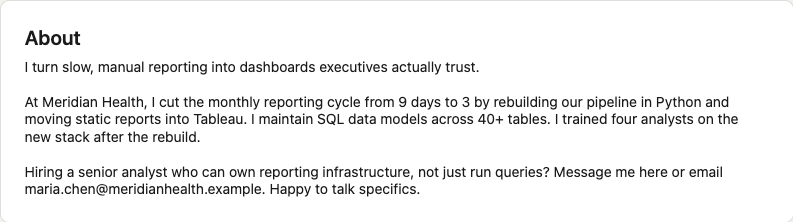
"I turn slow, manual reporting into dashboards executives actually trust.
At Meridian Health, I cut the monthly reporting cycle from 9 days to 3 by rebuilding our pipeline in Python and moving static reports into Tableau. I maintain SQL data models across 40+ tables. I trained four analysts on the new stack after the rebuild.
Hiring a senior analyst who can own reporting infrastructure, not just run queries? Message me here or email maria.chen@[email]. Happy to talk specifics."
Same person, same six years, same facts. What got cut: the origin story, "passionate about," the chronology. What survived: three numbers, 9 to 3, 40+, four.
The shape holds for a career switcher too. Marcus Webb spent seven years as a financial analyst before moving into revenue operations.
His weak About opened with "After years in finance, I've decided to pursue my passion for technology." His rewrite: "I bring finance-grade rigor to revenue operations." Proof: built the forecasting model finance used to close the playbooks two days faster; owned a $40M pipeline in Salesforce; SQL-certified through a nights-and-weekends bootcamp.
CTA: "Looking for someone who bridges finance and RevOps? DM me." Different industry, same three paragraphs.
Five Steps to Rewrite Yours
1. Cut the autobiography. No timeline, no "I've always been passionate about," no story about how you found your field. LinkedIn's own description of the section is that it's where you "express your mission, motivation, and skills"10, not a memoir. If a sentence could describe you five years ago as easily as today, cut it.
2. Write the Hook line. One sentence naming the outcome you deliver, not the title you hold. "I turn slow, manual reporting into dashboards executives trust" beats "Senior Data Analyst with 6 years of experience."
I learned this one the expensive way. My first rewrite of my own About read: "I'm a dynamic, results-driven marketing leader passionate about leveraging data-driven insights to unlock transformative growth for forward-thinking organizations." Every word sounded impressive. None of it said anything.
I'd cut the autobiography and cut the substance along with it. LinkedIn now ships an AI writing assistant that drafts About sections on request11. It's a fast way to produce exactly that kind of sentence if you accept its first draft.
3. Drop three Proof lines with numbers. Each line names a result, a scale, or a tool: a metric, a count, a dollar figure. Scan the job postings you're targeting for the skills and titles that keep repeating, and work those words into your proof lines5. A number does what an adjective can't.
4. Close with one specific CTA. LinkedIn's own guidance: end with an ask, and make it specific6. "Let's connect" isn't specific. "Hiring for X? Message me" is. Add an email if you want an extra channel for the reply; a worked Jobscan example uses one, though no source proves it changes response rate7.
5. Format for the fold. Only the first three to four lines of your About section show before a reader clicks "See more"12. Your Hook line has to sit inside those three or four lines. That's the only part of the section a scanning recruiter is guaranteed to read.
Write it in first person89, keep it under 2,600 characters2, and don't skip the keywords once the story is cut.
LinkedIn Recruiter's free-text Keywords filter highlights matches inside your About section directly, though Recruiter's own help docs still call the field "Summary"13, same field, older label.
LinkedIn also counts a filled-out About section toward the seven fields it uses to decide if your profile is "All-Star." That status is tied to how often your profile shows up in search at all1415.
The Template, Ready to Fill In
| Paragraph | Formula | Senior IC example | Career switcher example |
|---|---|---|---|
| Hook | I [verb] [outcome] for [audience/context]. | I turn slow, manual reporting into dashboards executives trust. | I bring finance-grade rigor to revenue operations. |
| Proof | [Result] · [Scale] · [Tool or skill] | Cut reporting cycle from 9 days to 3. Maintain SQL models across 40+ tables. Trained 4 analysts on the new stack. | Built the model that closed the playbooks 2 days faster. Owned a $40M pipeline in Salesforce. SQL-certified through a nights-and-weekends bootcamp. |
| CTA | [Specific ask]. [How to reach you]. | Hiring a senior analyst who can own reporting infrastructure? Message me here. | Looking for someone who bridges finance and RevOps? DM me. |
Fill in your own three lines, then read the whole thing back in under 2,600 characters2.
What Shows Above the Fold
Only your first three to four lines display before a reader clicks "See more"12. On most screens that's your Hook line and the start of your first Proof line. Plan for a recruiter who never clicks through, because plenty won't.
Five Checks Before You Publish
Your About section keeps a recruiter reading past the first line. Staying visible after they leave your profile is a different problem, and it's the one Chapter 3 solves.
Notes
-
Jobscan, "How to Create a LinkedIn Profile Recruiters Actually Read," Robert Henderson, CPRW, 2025. Source for the observation that About is the section "most users underutilize... or leave blank." Qualitative practitioner observation, not a measured statistic. https://www.jobscan.co/blog/linkedin-profile-writing-guide/ ↑ ↑
-
Jobscan, "LinkedIn Summary Examples: 21 Best Templates for 2026," Robert Henderson, CPRW, 2025. Source for the 2,600-character limit (~370 words). No LinkedIn Help Center page states this number directly; treat as Tier-2-confirmed via two independent Jobscan articles, not Tier-1-confirmed. https://www.jobscan.co/blog/linkedin-summary-examples/ ↑↑ ↑
-
LinkedIn Talent Solutions Blog, Jen Dewar, "14 LinkedIn Profile Summaries That We Love (And How to Boost Your Own)," Apr 30, 2024. Source for the structural guidance: strong opener, keywords woven in, no jargon, white space, conversational tone, specific closing ask. LinkedIn's own copy doesn't use the labels "Hook/Proof/CTA"; that framing is this playbook's. https://www.linkedin.com/business/talent/blog/product-tips/linkedin-profile-summaries-that-we-love-and-how-to-boost-your-own ↑
-
Jobscan, "How to Create a LinkedIn Profile Recruiters Actually Read," Robert Henderson, CPRW, 2025. Source for the 7-part structure: hook, current role/strengths, achievements with numbers, value to employers, personality, keywords, CTA. https://www.jobscan.co/blog/linkedin-profile-writing-guide/ ↑
-
Jobscan, "LinkedIn Summary Examples: 21 Best Templates for 2026," Hannah Baes, ed. Robert Henderson, CPRW, 2025. Source for scanning target job postings for repeated titles, tools, and skills to inform About-section keywords. https://www.jobscan.co/blog/linkedin-summary-examples/ ↑↑
-
LinkedIn Talent Solutions Blog, Jen Dewar, "14 LinkedIn Profile Summaries That We Love," Apr 30, 2024. Source for the closing-CTA guidance: end with an ask, and be specific. LinkedIn's copy does not itself recommend including an email address. https://www.linkedin.com/business/talent/blog/product-tips/linkedin-profile-summaries-that-we-love-and-how-to-boost-your-own ↑↑↑
-
Jobscan, "How to Create a LinkedIn Profile Recruiters Actually Read," Robert Henderson, CPRW, 2025. Source for a worked CTA example that includes an email address. This is a practitioner example, not response-rate or lift data; no source found ties adding an email to measurably better recruiter response. https://www.jobscan.co/blog/linkedin-profile-writing-guide/ ↑↑
-
LinkedIn Talent Solutions Blog, Jen Dewar, "14 LinkedIn Profile Summaries That We Love," Apr 30, 2024. Source for the direct first-person-vs-third-person comparison quoted in the chapter. https://www.linkedin.com/business/talent/blog/product-tips/linkedin-profile-summaries-that-we-love-and-how-to-boost-your-own ↑↑↑
-
Jobscan, "How to Create a LinkedIn Profile Recruiters Actually Read," Robert Henderson, CPRW, 2025. Corroborating source: "Most professionals prefer the first person because it feels more authentic and approachable." https://www.jobscan.co/blog/linkedin-profile-writing-guide/ ↑↑↑↑
-
LinkedIn Help Center, "Edit the About section on your profile," accessed 2026-08-14. Source for LinkedIn's own framing: About is "where you can express your mission, motivation, and skills." Does not prescribe a structure or state a character limit. https://www.linkedin.com/help/linkedin/answer/a553140 ↑
-
LinkedIn Help Center, "Enhance your profile with LinkedIn's AI-powered writing assistant," accessed 2026-08-14. Source for the assistant covering the About section (in addition to Headline and Experience). https://www.linkedin.com/help/linkedin/answer/a1444194 ↑
-
Jobscan, "How to Create a LinkedIn Profile Recruiters Actually Read," Robert Henderson, CPRW, 2025. Source for "only the first three to four lines are visible before readers click 'See more.'" Line-count claim, not a character count; no character count is used anywhere in this chapter. https://www.jobscan.co/blog/linkedin-profile-writing-guide/ ↑↑↑
-
LinkedIn Recruiter Help, "Use Boolean to filter search results in Recruiter and Recruiter Lite," accessed 2026-08-14. Source for the Keywords filter highlighting matches in the Summary section (LinkedIn Recruiter's help copy still uses "Summary"; the member-facing product calls the same field "About"). Same page cited as 9 in Chapter 1. https://www.linkedin.com/help/recruiter/answer/a415295 ↑
-
LinkedIn Help Center, "Your Profile level meter," accessed 2026-08-14. Source for About/Summary being one of seven sections counted toward "All-Star" profile status, and for LinkedIn's own statement that a more complete profile "helps improve the discoverability of your profile in search results." https://www.linkedin.com/help/linkedin/answer/a594698 ↑
-
LinkedIn Talent Solutions Blog, Jen Dewar, "14 LinkedIn Profile Summaries That We Love," Apr 30, 2024. Source for LinkedIn's own statement: "To improve your search rank on LinkedIn and Google, include keywords that highlight your top skills." https://www.linkedin.com/business/talent/blog/product-tips/linkedin-profile-summaries-that-we-love-and-how-to-boost-your-own ↑